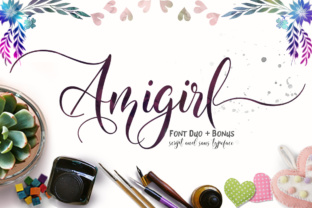
Amigirl: Elevating Your Designs with Feminine Flair
If you are looking to infuse your projects with a touch of elegance and undeniable style, Amigirl is a typeface that demands attention. This beautiful, swashy script was created specifically for display purposes, designed to act as the center point of your compositions rather than a background element. When used correctly, it transforms a standard layout into something wholly stylish and feminine. However, like any powerful design tool, its success depends entirely on how you handle it. Many creators rush to download and apply this font without understanding its nuances, leading to results that feel cluttered or unprofessional.
The allure of Amigirl lies in its flowing lines and decorative swashes. It captures a sense of movement and grace that sans-serif fonts simply cannot replicate. Whether you are a small business owner crafting a wedding invitation, a blogger designing a lifestyle post header, or a marketer creating a social media graphic, this font can provide the perfect finishing touch. Yet, the very features that make it attractive also pose significant challenges if misused. The difference between a stunning design and a messy one often comes down to respecting the limitations of the typeface.
Common Pitfalls in Script Font Usage
One of the most frequent mistakes designers make with Amigirl is treating it like a body text font. Because the characters are connected and feature elaborate flourishes, reading long paragraphs in this style becomes an exercise in frustration. The eye struggles to follow the continuous flow, causing reader fatigue and reducing comprehension. If you attempt to set a product description or a blog article in Amigirl, you will likely find that your audience skips over the content entirely. The font is intended for headlines, titles, logos, and short phrases where impact matters more than density.
Another critical error involves ignoring the importance of kerning and spacing. Swashy scripts naturally require more breathing room than block letters. When you place letters too close together, the swashes collide, creating a visual mess that obscures the letterforms. Conversely, spacing them too far apart breaks the illusion of fluidity, making the text look disjointed. A common oversight is failing to adjust the tracking manually after importing the font. Many users assume the default spacing provided by their software is sufficient, but high-quality design almost always requires manual tweaking to ensure the letters dance together harmoniously.
The Danger of Over-Styling
It is tempting to use Amigirl for every headline on a page because it looks so good. However, over-styling can dilute its impact. If every section of your website or brochure uses the same script font, nothing stands out. The "center point" nature of Amigirl means it should be reserved for key messages. When you apply it indiscriminately, you create visual noise that confuses the hierarchy of information. Readers need clear visual cues to know what is important; using a dominant font everywhere removes those cues.
Furthermore, pairing Amigirl with the wrong companion font can ruin the aesthetic balance. A common mistake is selecting a heavy, bold serif or a rigid geometric sans-serif that clashes with the soft curves of the script. The contrast must be deliberate. If the supporting text is too ornate, it competes with Amigirl for attention. If it is too plain, the script may look out of place. Successful pairings usually involve a clean, neutral sans-serif or a simple serif that allows the Amigirl to shine without distraction.
Evaluating Compatibility and Readability
Before you commit to using Amigirl in a commercial project, you must verify its compatibility across different platforms and devices. While modern browsers handle most web fonts well, older systems or specific mobile devices might not render the swashes correctly. This can result in missing ligatures or broken character connections, which undermines the professional quality of your work. Always test your designs on multiple screen sizes and operating systems before finalizing them. What looks perfect on a high-resolution desktop monitor might appear jagged or distorted on a smartphone.
Licensing is another area where beginners often stumble. Scripts like Amigirl are frequently subject to specific usage rights. Some licenses allow for personal use only, while others require a commercial license for business applications. Using a font without the proper permissions can lead to legal issues and unexpected costs later. It is essential to read the terms carefully. Do not assume that just because you downloaded the file, you have the right to use it on a client's website or a product package. Checking the license agreement is a non-negotiable step in the workflow.
Practical Strategies for Better Results
To avoid these pitfalls, start by defining the purpose of your design. Ask yourself: Is this text meant to be read quickly, or is it meant to set a mood? If the answer is the latter, Amigirl is an excellent choice. For the former, stick to highly legible fonts. When setting up your document, establish a clear hierarchy. Use Amigirl for the main title, perhaps a subtitle, and then switch to a clean, readable font for the body copy. This approach ensures that the beauty of the script enhances the message rather than hindering it.
When adjusting spacing, zoom in to 200% or higher. This magnification allows you to see exactly where the swashes intersect and whether the negative space between letters feels balanced. Don't be afraid to pull letters slightly apart or push them closer together until the rhythm feels right. Additionally, consider the color contrast. High-contrast colors can sometimes make thin script lines disappear or become hard to read. Ensure there is enough distinction between the text and the background to maintain clarity.
Finally, keep your audience in mind. If your target demographic includes older adults or people with visual impairments, prioritize readability over stylistic flair. In such cases, using Amigirl sparingly for accents rather than primary text is a wise decision. By focusing on practical application and avoiding the urge to force the font into unsuitable roles, you can harness the full potential of Amigirl. Remember, the goal is to create a design that communicates effectively while looking beautiful. With careful planning and attention to detail, this font can elevate your work from ordinary to extraordinary.