Villager: The Ballpoint Pen Script for Authentic Handwriting
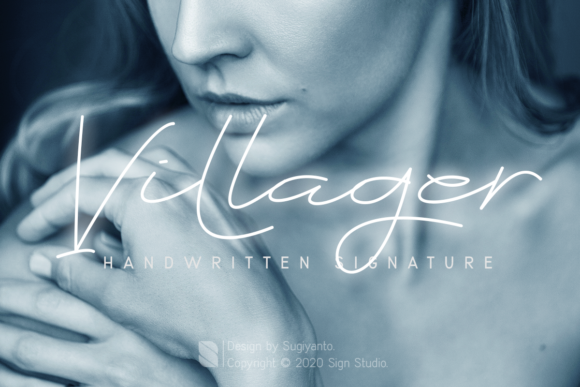
In a digital landscape saturated with perfectly kerned sans-serifs and rigid geometric typefaces, there is a distinct hunger for imperfection. We crave the texture of human touch, the slight wobble of a hand that feels real rather than algorithmic. Villager answers this call directly. It is not merely a font; it is a simulation of handwriting created specifically to mimic the fluid, slightly erratic motion of a ballpoint pen on paper.
This script font captures the natural shape of a signature or a quick note scribbled in a diary. By replicating the pressure variations and ink flow of a physical pen, Villager brings an immediate sense of intimacy to any project. Whether you are a designer looking to add warmth to a brand identity or a small business owner wanting to make your communications feel personal, this tool offers a bridge between the cold efficiency of digital design and the organic nature of human expression.
The Unique Character of Ballpoint Simulation
What sets Villager apart from other script fonts is its fidelity to the mechanics of writing with a ballpoint pen. Unlike brush scripts that simulate broad strokes or calligraphy styles that demand perfect form, Villager embraces the constraints of a simple stationery item. The lines have a consistent weight but retain the subtle jitter and connection points found when a pen glides across paper without lifting.
This specific aesthetic makes it incredibly versatile. Because it looks like something anyone could write quickly, it avoids the pretension of high-end calligraphy while still maintaining legibility. It feels accessible. When you see Villager, you don't think of a formal invitation or a luxury brand; you think of a friend's note, a casual reminder, or a personal journal entry. This psychological association is powerful for creators who want to lower the barrier between their content and their audience.
The font works best when used for short bursts of text. It excels at headlines, pull quotes, and individual words where the personality of the letterforms can shine without overwhelming the reader. Trying to set a long paragraph in Villager might reduce readability, but using it as a focal point creates a striking visual anchor that draws the eye immediately.
Practical Applications for Modern Creators
The utility of Villager extends far beyond simple decoration. Its natural shape allows it to serve multiple functional roles across various industries. Here are several ways professionals are adapting this script for tangible results.
- Personal Branding and Signatures: For freelancers, consultants, and coaches, authenticity is currency. Using Villager to create a digital signature or a logo element adds a layer of trust. It signals that a real person is behind the business, not a faceless corporation.
- Event Invitations and Posters: Casual themed events benefit immensely from this font. Whether it is a backyard BBQ, a community workshop, or a creative meetup, Villager sets the right tone. It suggests fun and informality without requiring complex graphic design skills.
- Diary and Journal Covers: Designers creating templates for planners or journals often struggle to find a font that doesn't look too "printed." Villager solves this by mimicking the act of writing itself, making the product feel ready to be filled with thoughts.
- Business Cards with a Twist: While traditional cards rely on clean typography, a card featuring a Villager headline can stand out in a stack of corporate materials. It implies creativity and approachability, ideal for artists, photographers, and lifestyle bloggers.
Tailoring the Font to Your Audience
Different audiences respond to different levels of formality. Understanding how to adapt Villager is key to effective communication. If you are targeting an audience of young entrepreneurs or hobbyists, the casual nature of the font aligns perfectly with their desire for grassroots, authentic connections. However, if your audience expects strict professionalism, such as in legal or financial sectors, Villager should be used sparingly, perhaps only for accent words to soften the overall message.
The versatility of the font also allows for stylistic variations. You can pair Villager with a clean, modern sans-serif body text. This contrast ensures that the detailed script does not clutter the information hierarchy. The sans-serif provides structure and clarity, while Villager provides the emotional hook. This combination is particularly effective for blog headers, social media graphics, and email marketing campaigns where you need to grab attention quickly.
Design Strategies for Clarity and Impact
To get the most out of Villager, you must respect its limitations. A common mistake is overusing script fonts in hopes of adding character. Instead, treat Villager as a spice. Use it to highlight specific elements rather than drowning the entire design in handwriting. Consistency is crucial; ensure that the spacing (kerning) is adjusted carefully. Since the letters connect naturally, tight spacing can cause them to merge into illegible blobs, while loose spacing breaks the illusion of a single stroke.
Consider the color palette as well. The ballpoint pen simulation often looks best in deep blues, blacks, or rich purples, which mimic actual ink. Avoid neon colors or overly bright backgrounds that clash with the organic feel of the script. High contrast between the text and the background is essential for maintaining legibility, especially when the font is used for headlines.
For marketers and publishers, Villager offers a unique opportunity to humanize data-driven content. Imagine a report on mental health trends where the title uses Villager to suggest a personal story, followed by structured data presented in a neutral font. This approach can make dry statistics feel more relatable and urgent. Similarly, educators can use the font to create worksheets or certificates that feel encouraging and personal rather than bureaucratic.
Building Originality Without the Hype
In a world of generic templates, originality comes from thoughtful application. Do not simply drop Villager onto an image and hope for the best. Experiment with layout. Try placing the text diagonally to mimic the angle of a hand writing on a desk. Layer it over textures like watercolor washes or grainy paper scans to enhance the tactile quality. These small adjustments demonstrate a level of care that resonates with viewers.
Remember that the goal is to inspire action, not just to look pretty. Whether you are designing a poster to promote a local event or a business card to secure a new client, Villager helps convey the message that your work is grounded in reality. It invites the viewer to engage with the content as if they were reading a note from a friend.
By focusing on the practical benefits of this script—its ability to simulate human touch, its flexibility across formats, and its capacity to build trust—you can leverage Villager to create designs that are both beautiful and effective. It is a tool for those who understand that in a digital age, the most powerful design choices are often the ones that remind us we are human.