Chomolatte: The Modern Script That Balances Boldness and Elegance
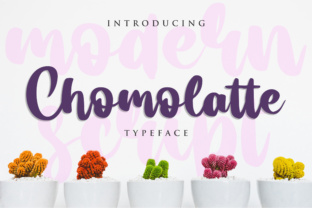
In a digital landscape saturated with generic sans-serifs and predictable serif fonts, Chomolatte stands out as a distinct choice for designers seeking a balance between weight and grace. This modern script font is not merely another decorative typeface; it is a tool designed to give your design a striking look without sacrificing readability. With its thick, yet elegant letters, Chomolatte offers a unique texture that can elevate branding, social media graphics, and editorial layouts alike.
However, the allure of a bold script often leads to hasty decisions. Many creators download this font expecting instant magic, only to find their designs feeling heavy or cluttered. The difference between a professional finish and a amateurish mess often lies in how you understand the specific characteristics of the typeface and where you apply it. Before you commit to using Chomolatte in your next project, it is essential to navigate the common pitfalls associated with script typography.
The Trap of Over-Emphasis
One of the most frequent mistakes I see with Chomolatte is the tendency to overuse its defining characteristic: its thickness. Because the letters are naturally bold, there is an urge to use them for every headline, subheading, and body text element. While the font has a commanding presence, treating it as a universal solution can overwhelm your audience. When everything screams for attention, nothing does.
If you use Chomolatte for long paragraphs of text, the visual weight becomes exhausting to read. The thick strokes reduce the white space within the characters, causing them to blur together at smaller sizes. This directly impacts usability and reader satisfaction. Instead of trying to force the font into every corner of your layout, reserve it for impact areas. Use it for main headlines, logo lockups, or short pull quotes where its elegance can shine without competing with other elements.
A better approach is to pair Chomolatte with a neutral, clean typeface for supporting text. A simple geometric sans-serif or a classic serif can provide the necessary contrast, allowing the script to act as the star while the secondary text handles the information delivery. This creates a hierarchy that guides the eye naturally rather than trapping it in a wall of bold ink.
Misjudging Context and Brand Voice
Another critical area where users stumble is failing to evaluate whether Chomolatte fits the brand voice. The font's "thick, yet elegant" description suggests versatility, but it carries a specific personality. It feels contemporary, confident, and slightly playful. If you are designing for a law firm, a medical clinic, or a serious financial institution, this font might clash with the desired tone of authority and trustworthiness.
Using a font that contradicts your message can confuse your audience and dilute your communication. For instance, a luxury jewelry brand might find Chomolatte too casual, whereas a trendy coffee shop or a creative agency would likely embrace its energy. Before downloading or purchasing, ask yourself what emotion you want the viewer to feel. Does the boldness of the script align with your business goals? If the answer is no, consider saving your budget for a more appropriate typeface.
Furthermore, do not assume that because a font looks good on a screen, it will translate well to print. The thickness that makes Chomolatte pop on a mobile display might cause issues with ink spread on paper if not managed correctly. Always test your designs in the final medium before going to press to ensure the lines remain crisp and distinct.
Evaluating Download Sources and Licensing
When searching for Chomolatte, beginners often fall into the trap of downloading from unverified sources. The internet is full of sites offering free versions of premium fonts that may be corrupted, incomplete, or legally risky. Using a compromised font file can lead to technical errors in your software, missing glyphs, or even security vulnerabilities on your computer.
Moreover, ignoring licensing terms is a costly mistake. Just because a font is available for free download does not mean it is free for commercial use. You might create a stunning campaign only to receive a cease-and-desist letter later because you used a personal license for a client project. This affects your efficiency and cost management significantly, as fixing legal issues is far more expensive than paying for a proper license upfront.
To avoid these headaches, always purchase or download Chomolatte from reputable marketplaces or the official designer's website. Check the license agreement carefully to understand what you can and cannot do. Look for details regarding web font usage, embedding in apps, and the number of projects allowed. Taking these precautions ensures that your work remains secure and professional.
Neglecting Kerning and Spacing
Even when you have the right font and the right license, the execution matters most. Script fonts like Chomolatte rely heavily on the relationship between letters. Unlike blocky sans-serifs, scripts have varying widths and natural connections. Ignoring kerning (the spacing between specific pairs of letters) can make your design look sloppy and unpolished.
A common error is leaving the default spacing intact. In many cases, the default settings result in gaps that are too wide or letters that overlap awkwardly, breaking the flow of the word. This lack of attention to detail reduces the perceived quality of your work instantly. Clients and viewers may not know exactly why they dislike the design, but they will sense that something feels "off."
Take the time to manually adjust the tracking and kerning. Zoom in and check the negative space between each character. Ensure that the thick parts of the letters do not touch unintentionally, unless that is a deliberate stylistic choice. Good spacing turns a collection of shapes into a cohesive word. It is the difference between a font that looks like a template and one that looks custom-made.
Comparing Alternatives Without Purpose
Frequently, users browse through dozens of similar fonts before settling on Chomolatte, getting lost in the noise. They might choose a font simply because it is trending or because it is cheaper, without actually comparing how it performs in their specific context. This leads to buyer's remorse and wasted resources.
Instead of scrolling endlessly, define your needs first. Do you need a font for a wedding invitation, a tech startup logo, or a blog header? Once you have a clear goal, compare Chomolatte against three or four other options specifically for those scenarios. Create side-by-side mockups. See how the legibility holds up at different sizes. Notice how the "thick" strokes interact with your color palette.
By focusing on practical application rather than aesthetic preference alone, you make a more informed decision. You might discover that while Chomolatte is beautiful, another font serves your functional requirements better. Or, you might confirm that Chomolatte is indeed the perfect match, giving you the confidence to move forward with your project.
Final Thoughts on Usage
Chomolatte is a powerful asset for any designer looking to add a modern, elegant touch to their work. Its thick, yet elegant letters offer a striking look that can define a brand identity. However, success depends on respecting the limitations of the typeface and applying it with intention. Avoid the temptation to overuse it, ensure it matches your brand voice, verify your licensing, pay attention to spacing, and compare it against alternatives thoughtfully.
By steering clear of these common mistakes, you transform Chomolatte from a mere download into a strategic design element. Whether you are a seasoned professional or just starting your journey, taking the time to understand the nuances of this font will save you time, money, and frustration. Let your designs speak clearly and beautifully by choosing the right tools for the job.